Enhanced 911 (US Only)
Introduction
E911 (Enhanced 911) is a service that automatically provides emergency responders with the caller’s phone number and the registered physical location when dialing 911 from your contact center system. This is crucial for ensuring timely and accurate response in emergency situations.
When enabled, contact centre agents in NEONNOW configure their current address upon login, and should update it following a physical change in location. Amazon Connect allows for testing of this 911 functionality via a test number 933.
Configuration
NEONNOW Admin, under Instance\Agents, toggle on the ‘Enhanced Emergency Calling’ feature.
This will enable the address collection functionality for agents:
-
Agents will be able to set & update their address under ‘preferences’
-
The agent’s address will be retrievable via a Lambda function that should be called via the Outbound Whisper Flow associated with the agents, as detailed below
Outbound Whisper Flow Setup
Overview
To utilize Amazon Connect’s in-built E911 functionality, the user’s address must be set to the Contact Attribute ‘CivicAddress’ in a very specific format. For an overview, please see Amazon’s guide here.
In addition, the address should be formatted and verified to ensure it matches the standard PSAP address keys. This is done within NEONNOW when the agent saves their address so there is no need to check this within the Outbound Whisper flow.
Configuring the Flow
Carry out the following steps to retrieve and set the agent address:
-
Set Logging, if this aligns to your requirements
-
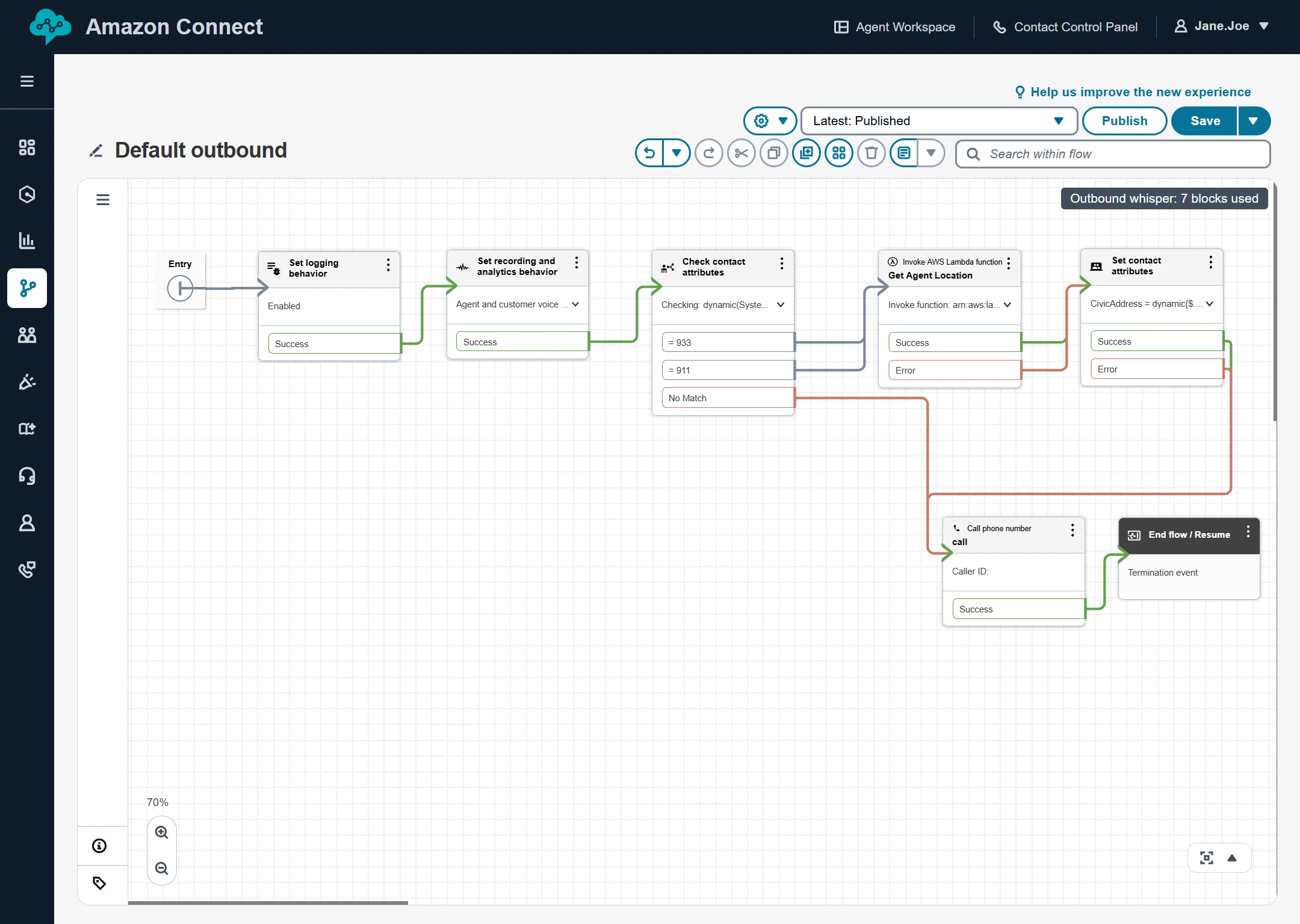
Add a ‘Check contact attributes’ block, to check ‘Customer endpoint address equals 911 or 933
-
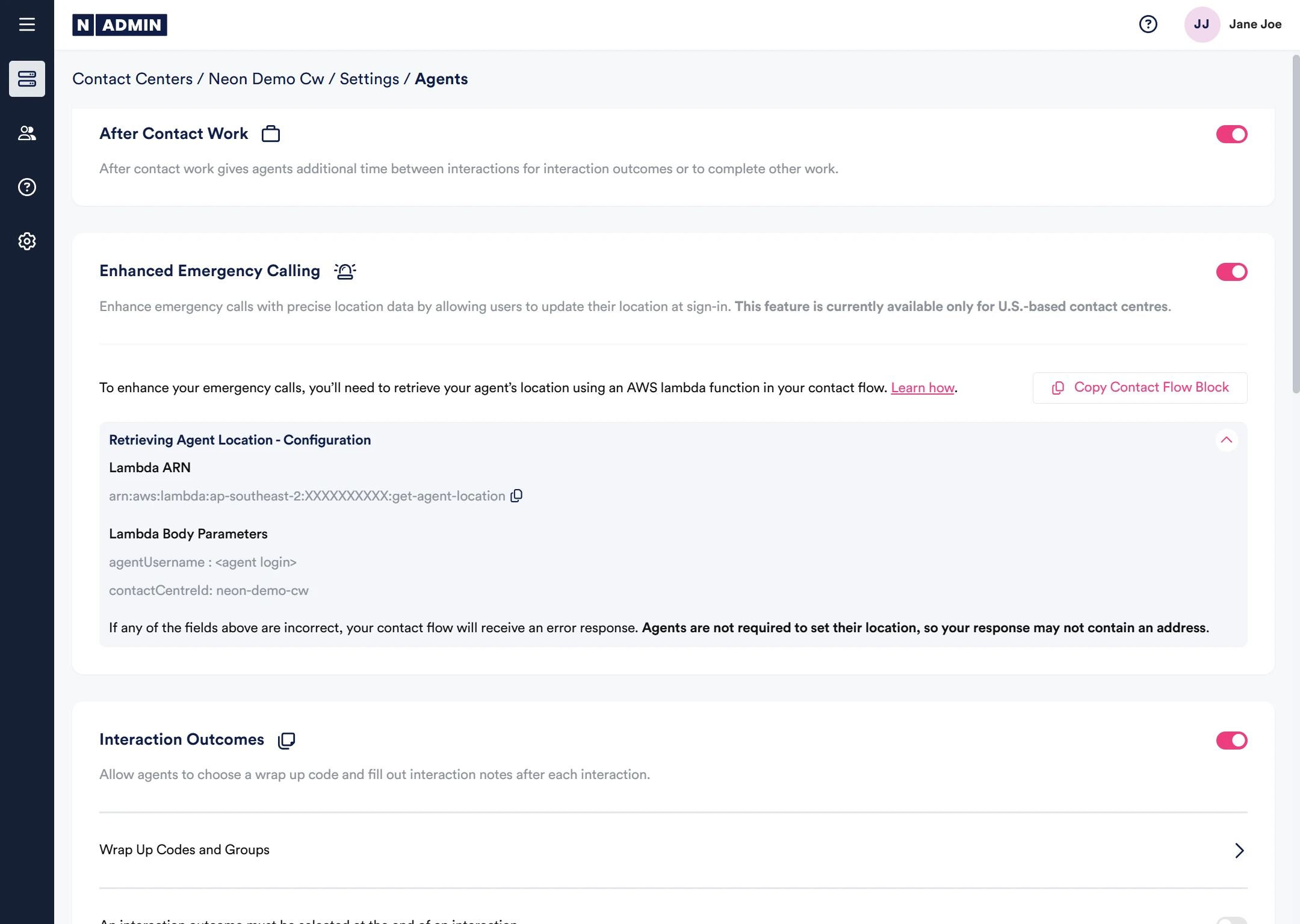
If there is a match, connect a Lambda function - the Lambda endpoint will be specified within NEONNOW Admin as shown below:
-
Following the Lambda invocation, set a Contact Attribute ‘CivicAddress' to the value of $.External.location. Note, in addition, $.External.statusCode can be used to check for a valid return (200).
-
In addition, the agent CallBack number can be used and stored - e.g. mapped for emergency services return calls etc - access by reading returned $.External.callbackNumber
The following screenshot shows a sample end to end flow:
Saving the Address
Where the Agent’s address is not set, the following screen will appear for the agent upon login:
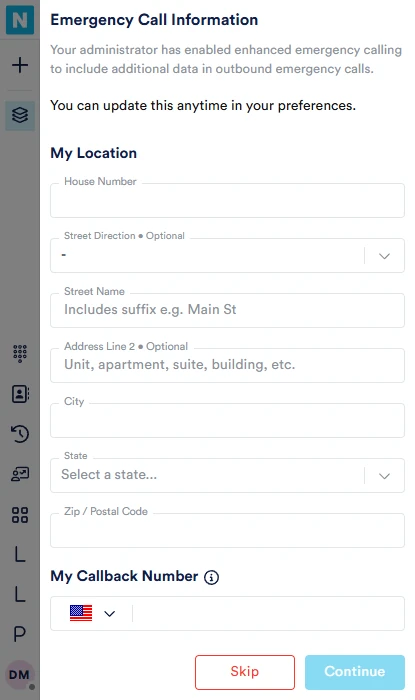
Once the address and callback number entered, the agent should select ‘Continue’. Enter the callback number a second time then select 'Continue. ‘Skip' will delay agent location entry until the next login.
Note - At any point, agents can access and set their address via Preferences/My Location.
Address Validations
The entered address is validated against an address verification service (using an AWS Service). If the address returns"Oops, it looks like your address isn't quite right. Please update and try again" try the following:
- Street suffix abbreviation must be used - i.e. ‘Main St’, not ‘Main Street’.
- Often multiple addresses are used for a single location - search online, google is a reasonable check - are you using the offical suburb name etc?
Emergency Service Call-Backs
If an outbound call to emergency services is disconnected, you can route any return calls to the agents personal number by saving the agents 'callbackNumber' against a DNIS pool when the outbound call is made. The agent will set their call-back number as part of the e911 form.
As above, this can be accessed via $.External.callbackNumber.
Testing
To test the E911 address configuration, once the above steps are completed, dial 933 from the configured agent’s NEONNOW dialpad. If configured correctly, Amazon Connect will readback that the number is ‘Enabled for 911’. It will also read out the address. If there are issues, check the Contact Flow log to debug.